
This manual introduces the connection and setting methods of Panasonic SC-ZT2 home theater audio system.
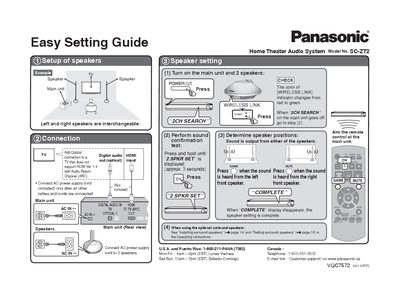
The document is an Easy Setting Guide for the Panasonic SC-ZT2 Home Theater Audio System. It details the initial setup process, specifically focusing on connecting speakers to the main unit and establishing a wireless link between components.
Key steps include turning on the power, waiting for the 'WIRELESS LINK' indicator to change from red to green, and using the remote control to determine the correct positions for left and right front speakers. The guide also notes that the system supports Audio Return Channel (ARC) connections.
The model number for this system is SC-ZT2.
You must connect the AC power supply cord only after all other cables and cords are connected.
The wireless link search takes approximately 3 seconds.