
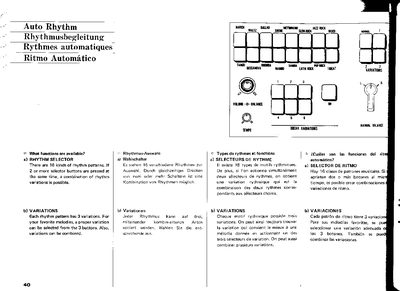
The Yamaha AUTO Rhythm features 16 selectable rhythm patterns, each with three variations. Users can combine rhythm patterns by pressing two or more selector buttons simultaneously. Additionally, each pattern offers variations that can be combined for diverse musical accompaniment.
The device includes controls for volume and balance, allowing users to adjust the rhythm volume relative to the keyboard and balance the drum and cymbal sections. It also features 8-bar and 16-bar variation buttons, as well as six different break variation patterns for phrase changes.
| Number of rhythm patterns | 16 kinds |
|---|---|
| Variations per pattern | 3 variations |
| Break variation types | 6 different kinds |
If 2 or more selector buttons are pressed at the same time, a combination of rhythm variations is possible.
It is used to balance the drum and cymbal volume in the rhythm. Turning it left emphasizes bass and drums, while turning it right emphasizes cymbals or high hats.
If the 8 BAR button is pressed for every 8 bars, rhythm variations '3' of rhythm patterns are automatically added.