
The document is an instruction manual for a digital piano. The piano has various features, including 3 types of reverb, touch sensitivity adjustment, metronome volume adjustment, dual octave setting, etc. It can also load demo songs and preset songs from a computer, and choose different time signatures and tempos for the metronome. The digital piano also has standard piano touch response and versatile volume adjustment. It provides a list of 50 great piano songs as preset songs.
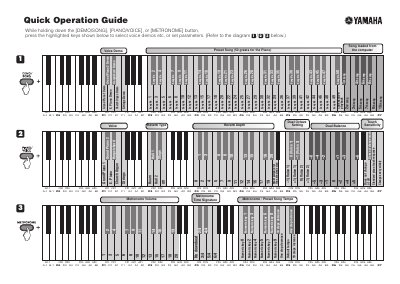
This guide explains how to select preset voice demos and songs loaded from a computer by holding down specific buttons and pressing highlighted keys. It covers options such as Grand Piano, Harpsichord, and Church Organ demos, as well as specific song numbers.
While holding down the [DEMO/SONG], [PIANO/VOICE], or [METRONOME] button, press the highlighted keys shown below.
The standard pitch is set to 440.0 Hz.
You can tune down in about 0.2Hz steps by pressing any highlighted key.