
This manual describes the standard assembly of the DTX950K. After assembling the parts and connecting the cords as shown below, the Drum Trigger Module is ready to be turned on.
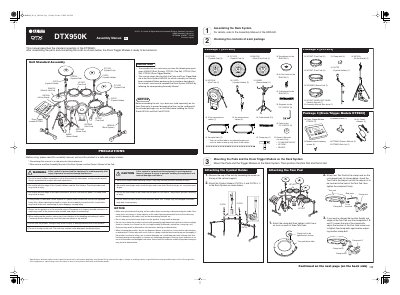
This manual provides step-by-step instructions for the standard assembly of the Yamaha DTX950K electronic drum kit. It details how to attach the Cymbal Pads, Tom Pads, Kick Pad, Snare Pad, and Hi-Hat Pad to the HXR4LD Rack System, as well as mounting the DTX900 Drum Trigger Module.
The guide covers the physical setup of the hardware, including attaching cymbal holders, adjusting pad positions, and connecting stereo phone cables from the pads to the module. It also includes specific instructions for assembling the Hi-Hat Stand and connecting the AC power adapter to the module.
| Product Name | DTX950K |
|---|---|
| Rack System Model | HXR4LD |
| Drum Trigger Module Model | DTX900 |
| Cymbal Pad Models | PCY135, PCY155, RHH135 |
| Kick Pad Model | KP125W |
| Snare Pad Model | XP120SD |
| Hi-Hat Stand Model | HS740A |
You need the HXR4LD Rack System, DTP900 Pad Set, DTP902 Pad Set, and DTX900 Drum Trigger Module.
Lay a drum mat or cardboard on the floor to prevent damaging the floor or scratching surfaces.
Connect the pads to the module using stereo phone cables, inserting straight plugs into the module and L-shaped plugs into the pads.