
This is the manual of an electronic piano product, which mainly introduces the product's features, including voice type, touch sensitivity, reverb depth, metronome volume, metronome/preset song tempo, metronome time signature, dual octave setting, dual balance voice, demo song, preset song (50 greats for the piano).
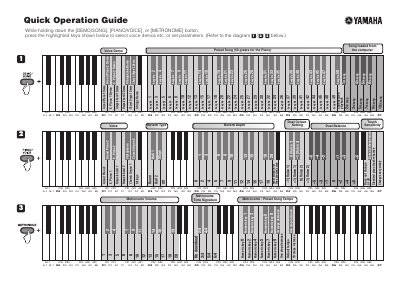
This document serves as a quick reference guide for operating Yamaha keyboard instruments. It details the specific key combinations required to access various functions while holding down designated buttons such as [DEMO], [METRONOME], or [VOICE].
The guide covers essential features including Voice Demo Presets, Metronome settings (Volume, Time Signature, Tempo), and MIDI configuration options like Program Change, Transmit Channel, and Transpose. It also provides instructions for tuning adjustments relative to the standard pitch of 440.0 Hz.
The standard pitch is 440.0 Hz.
While holding down the [DEMO], [METRONOME], or [VOICE] button, press the highlighted keys shown in the guide.