
The document is an explanation of city code table and operating precautions. The city code table lists the UTC offsets of various cities and the use of daylight saving time in some cities. The operating precautions include not using or storing the clock in areas exposed to temperature extremes, strong magnetism, strong vibration, or strong impact, keeping the clock away from heaters and direct sunlight, not using the clock in a bathroom or any other area subject to high humidity, not trying to take the clock apart, and cleaning the clock with a soft, dry cloth or a cloth moistened in a solution of water and a mild neutral detergent.
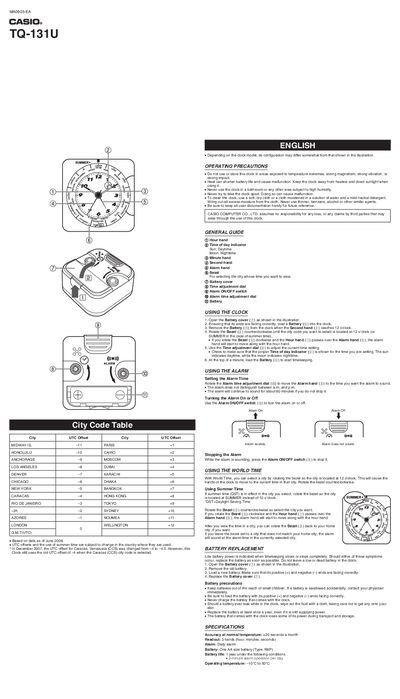
The Casio TQ-131U is a three-hand analog world clock that allows users to select different cities by rotating the bezel. It features a daily alarm function with an ON/OFF switch and displays the current time in the selected location along with local UTC offsets.
To operate the clock, insert one AA battery (Type: REP) into the back cover. Users can adjust the time using the dial and set the alarm by rotating the dedicated adjustment dial. The manual also details how to replace batteries and lists operating precautions.
| Accuracy | +20 seconds a month |
|---|---|
| Readout | 3 hands (hour, minutes, seconds) |
| Alarm Type | Daily alarm |
| Battery Type | One AA size battery (Type: REP) |
| Battery Life | 1 year |
| Operating Temperature | 10°C to 50°C |
Rotate the Alarm time adjustment dial to move the Alarm hand to the desired time.
No, the alarm does not distinguish between a.m. and p.m.
The alarm will continue to sound for about 60 minutes if you do not stop it.
Timekeeping slows or stops completely when the battery is low.