
This document is about the user manual of iPod classic
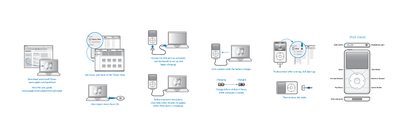
This Quick Start Guide shows how to connect the iPod classic to a computer via the USB port, charge the device, and use the Click Wheel for basic navigation, playback, and volume control. It also explains how to reset the iPod, turn it on or off, and access common functions such as shuffling songs.
For complete instructions and safety information, the guide points users to the full iPod classic User Guide available on Apple’s website.
| Battery charge time | at least 4 hours |
|---|
Connect it to a USB port on a computer and charge for at least four hours while the computer is awake.
Press and hold the Play/Pause button for a few seconds.