
This is a quick guide about Nokia card phones, explaining how to use Nokia card phones with Outlook 98. The document includes steps for setting up Internet email, adding new services, etc.
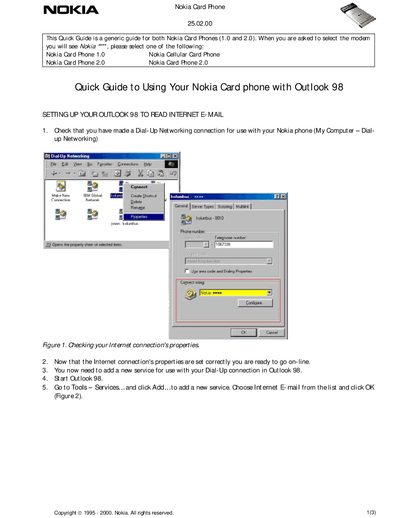
This guide explains how to configure a dial‑up networking connection for a Nokia Card Phone and add an Internet e‑mail service in Outlook 98. It walks you through checking the connection properties, creating a new service, and entering the mail account settings.
After the account is configured, the guide describes how to retrieve mail, including options to download full messages or only headers, and how to finish the setup and go online with the phone connected to the PC.
| Supported models | Nokia Card Phone 1.0, Nokia Card Phone 2.0 |
|---|---|
| Supported software | Outlook 98 |
Open Outlook 98, go to Tools → Services, click Add…, choose Internet E‑mail, and click OK.
Select “Do only the following — Retrieve new message headers” to download only the headers, which is faster.
Open the connection’s properties in Dial‑up Networking and verify the settings as shown in Figure 1.
Click Apply and OK, then exit Outlook, restart it, and reconnect using the newly created service.