
This article offers an introduction to programming PIC chips using the free version of Flowcode and shows how to create two simple programs for the PICkit 2 44-pin Demo Board. It starts with a simple LED flashing program to familiarize the reader with the basic operation of Flowcode and the PICkit 2. Then, it explores a more complex program using a thermistor.
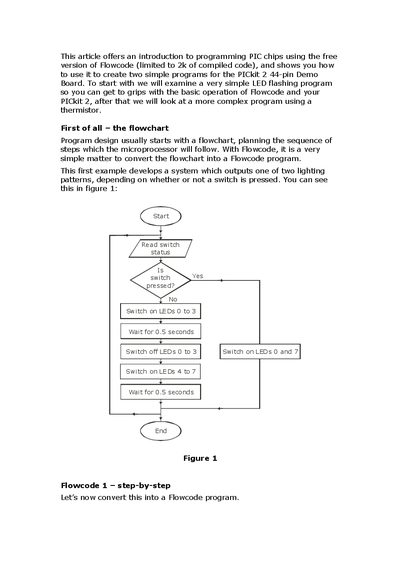
This article introduces programming PIC chips with the free version of Flowcode, showing how to create simple LED flashing programs for the PICkit 2 44‑pin Demo Board. It walks through flowchart design, component connections, and configuring Flowcode icons to control LEDs and a switch.
The guide then explains how to simulate the program, compile it, and transfer it to the PIC using the PICkit 2 module. It also covers adding a temperature sensor with a thermistor and adjusting decision thresholds for temperature‑sensitive operation.
| Demo Board pins | 44‑pin |
|---|---|
| Flowcode version | Free version limited to 2 k of compiled code |
Select the Chip menu, then choose “Compile to Chip…”. After the transfer finishes, the Compiler Messages window will show “FINISHED”.
The LEDs are connected to Port D; each LED corresponds to a bit of Port D (LED 0‑3 to bits 0‑3, LED 4‑7 to bits 4‑7).