
Casio cfx-9850G Plus is a scientific calculator that supports multiple mathematical operations, including calculus, algebra, statistics, etc.
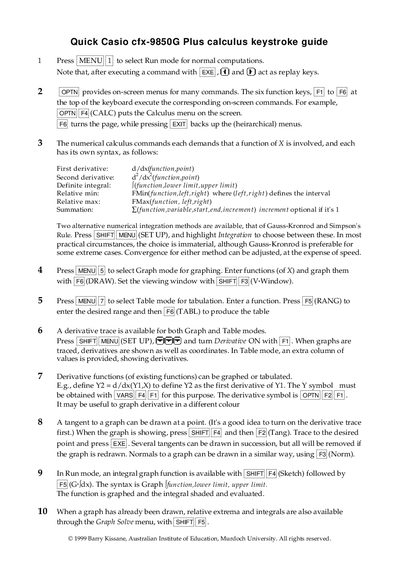
This guide explains the keystrokes needed to perform calculus operations on the Casio cfx-9850G Plus, including first and second derivatives, definite integrals, relative minima and maxima, and summations. It also describes the syntax for each command, such as d/dx(function,point) for a first derivative.
Additional sections cover graphing and table modes, how to enable derivative tracing, and how to draw tangents, normals, and integral shading. The guide also outlines the two numerical integration methods (Gauss‑Kronrod and Simpson's Rule) and how to select them via the SET UP menu.
| Model | cfx-9850G Plus |
|---|
Use the command d/dx(function,point).
Enter I(function, lower limit, upper limit).
Press (SET UP), (IIE) and turn Derivative ON.