
This is the instruction manual for Citizen 9800 series solar-powered watches, which mainly introduces the functions, use methods and maintenance of the watches
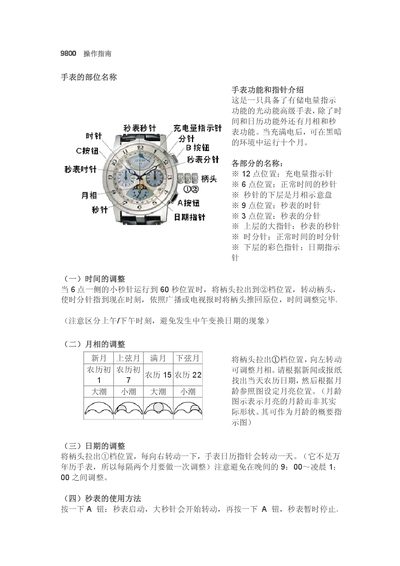
This manual describes the parts of the Citizen 9800 watch and provides step‑by‑step instructions for setting the time, date, and moon‑phase indicators. It also covers the use of the chronograph function and how to read the power‑reserve indicator.
Additional sections explain how to perform a system reset after exposure to static electricity or magnetic fields, and give troubleshooting tips for inaccurate hands. This manual is written in Chinese.
| Power reserve (full charge) | up to 9–10 months |
|---|---|
| Chronograph accuracy | 0.2 s (1/5 s) per tick |
Pull the crown out to the first position, turn it until the hour and minute hands show the correct time, then push the crown back in.
First charge the watch to at least level 2, pull the crown out when the seconds hand is at 0, then readjust all hands; if it still does not work, send it to a Citizen service center.
The position of the power‑reserve hand shows the charge level: level 1 indicates 6 days‑6 months, level 2 indicates 6‑9 months, and level 3 indicates 9‑10 months of operation.