
This document introduces how to use Bluetooth dial-up Internet access, including connecting Bluetooth devices, dialing up the Internet, disconnecting and reconnecting, and modifying network connection settings.
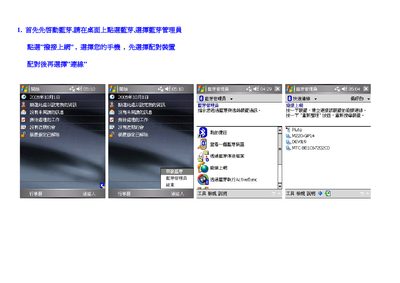
This manual explains how to enable Bluetooth on the phone, pair it with other devices, and use the connection to access the internet and other services. It guides the user through the initial setup, selecting the Bluetooth manager, and establishing a successful link.
The document also covers advanced options such as modifying network connection parameters, refreshing the device list, and troubleshooting connection failures. Users can adjust settings via the "我的捷径" (My Shortcuts) interface and confirm changes with the OK button. This manual is written in Chinese.
Open "我的捷径" (My Shortcuts), select the connection you want to edit, view its "属性" (attributes), and adjust the settings before confirming with OK.