
This document introduces the main function parameters, panel diagram, indicator light status instructions, view function instructions, overload current setting, protection delay time setting, and operation instructions of the Xinda QM-C motor protector. The protector is characterized by high performance and stability.
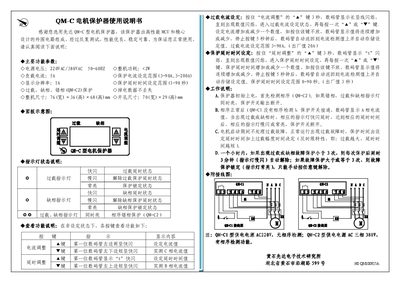
The Xian Da QM-C motor protector is a high‑performance device that combines an MCU with a carefully designed external circuit. It provides overload, phase‑loss and phase‑error protection with adjustable current and delay settings.
The manual describes the main functional parameters, panel layout, indicator meanings, how to adjust overload current and protection delay, operating principles, and includes wiring diagrams for both 220 V and 380 V power supplies. This manual is written in Chinese.
| Power supply voltage | 220 VAC / 380 VAC 50‑60 Hz |
|---|---|
| Power consumption | < 2 W |
| Load current | 5 A |
| Protection current setting range | 3 A – 900 A (or 3 A – 1200 A) |
| Display resolution | 1 A |
| Protection delay time range | 0 s – 90 s |
| Overall dimensions | 76 mm (W) × 36 mm (H) × 68 mm (D) |
| Opening size | 70 mm (W) × 29 mm (H) |
Press and hold the “▲” key for 3 seconds; the numeric display will flash, then use the “▲” or “▼” keys to increase or decrease the current value. Release the key for 5 seconds to store the setting.
Hold the “▲” key on the “延时调 整” button for 3 seconds; the display shows “t” flashing. Then use the “▲” or “▼” keys to change the delay time, releasing the key for 5 seconds saves the setting.
Both overload and phase‑loss indicator lights flash, and the protection switch opens, cutting power to the motor.