
DMDPW meter operation manual, introduces the basic settings, output signal settings, relay settings and other functions.
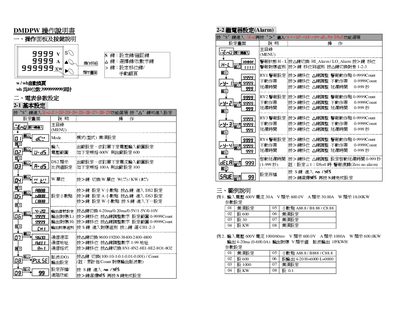
This manual describes the operation panel, key functions, and how to configure basic parameters such as voltage, current, and alarm settings for the DMDPW device. It includes step‑by‑step procedures for entering menus, adjusting alarm thresholds, and configuring output ranges.
The document also covers communication settings, including MODBUS‑RTU protocol details, baud‑rate selection, and register mapping for data acquisition. Example configurations and troubleshooting tips are provided for both input and output functions. This manual is written in Japanese.
| Maximum Input Voltage | 600 V |
|---|---|
| Maximum Input Current | 100 A |
| Analog Output Range | 4‑20 mA (0‑600 A) |
| Supported Baud Rates | 9600, 19200, 38400, 2400, 4800 bps |
| Communication Protocol | MODBUS‑RTU |
Press the “S” key to enter the function selection menu, then use the appropriate keys to adjust settings.
Use the alarm‑setting keys (e.g., “>” and “A”) to move to the alarm group and adjust the high/low alarm values as needed.
The device supports 9600, 19200, 38400, 2400, and 4800 bps.
The device uses the MODBUS‑RTU protocol for communication.