
Gigaset C450 is a powerful phone that allows you to set up to 100 phone numbers, use the hands-free function, alarm clock function and more.
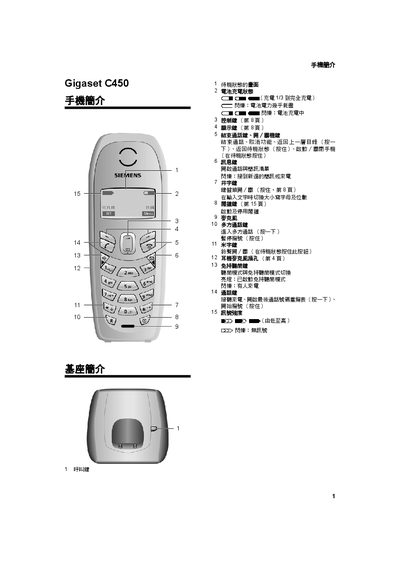
This manual explains how to install the base unit, register the handset, and connect the power supply. It also covers battery installation, first‑time charging, and how to replace the battery safely.
Detailed sections describe menu navigation, making and receiving calls, using the hands‑free and speaker functions, and adjusting audio, date/time, and other settings. Maintenance tips, safety warnings, and a specifications table are included at the end. This manual is written in Chinese.
| Standby time | ≈130 hours |
|---|---|
| Talk time | ≈13 hours |
| Charging time | ≈13 hours |
| Battery capacity (recommended) | Panasonic 700 mAh (DECT) |
| Standby power consumption | ≈2 W |
| Talk power consumption | ≈3 W |
Press the end‑call key and then charge or replace the battery as described in the manual.
Use the rechargeable battery recommended by Siemens on page 17; do not use non‑rechargeable batteries.