
This is a user manual for the EP-MVP3G-M ISA/PCI/AGP mainboard. It includes the mainboard's features and usage methods.
The EP-MVP3G-M is an ATX‑form factor motherboard that supports ISA, PCI and AGP expansion slots, includes an onboard PCI IDE controller and a Super Multi‑I/O module. It features a ZIF socket for 7‑pin CPUs, multiple DIMM slots, and connectors for USB, PS/2, serial, parallel and audio.
The document walks the user through the Award BIOS setup utility, showing how to load default settings, configure supervisor and user passwords, set chipset options, enable IDE auto‑detection, manage power settings, and configure PNP/PCI devices. Connector pin‑outs and an AGP driver installation guide for Windows 95 are also included. This manual is written in Chinese.
| Form factor | ATX |
|---|---|
| CPU socket | ZIF socket 7 |
| Memory | 1024KB Pipeline Burst SRAM |
| Onboard storage controller | PCI IDE |
| BIOS type | Award BIOS |
| Power supply requirement | 5V SB 0.1 W (100 mA) |
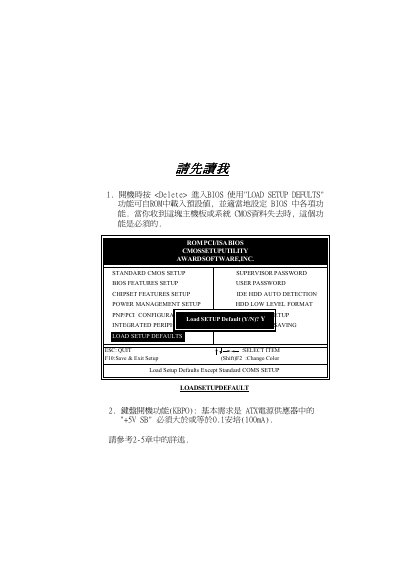
Select the “Load Setup Defaults” option in the BIOS Setup Utility and confirm the change.
In the BIOS Setup Utility choose the “Supervisor Password” entry and enter the desired password.