
B8572 is a rugged and easy-to-use resistance tester that can be used for insulation resistance testing, static resistance testing, continuity testing, and general resistance testing. It has multiple testing modes and ranges, and can display real-time test voltage and test current.
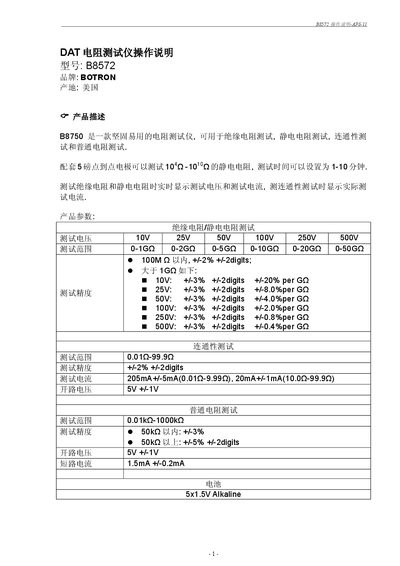
The Botron B8572 is a rugged resistance tester capable of insulation, static, continuity, and ordinary resistance measurements. It offers selectable test voltages from 10 V to 500 V and a range of measurement modes to suit various industry standards.
The manual explains how to power on the device, select test modes by rotating the knob, configure test time and current limits, and interpret results. It also includes details on the point‑to‑point heavy‑hammer electrodes, battery requirements, and warranty terms. This manual is written in Chinese.
| Selectable test voltages | 10 V, 25 V, 50 V, 100 V, 250 V, 500 V |
|---|---|
| Insulation resistance range (10 V) | 0‑1 GΩ |
| Continuity test range | 0.01 Ω‑99.9 Ω |
| Ordinary resistance test range | 0.01 kΩ‑1000 kΩ |
| Battery type | 5 × 1.5 V Alkaline |
| Heavy‑hammer electrode weight | 5 lb |
Rotate the knob to the voltage selection area to start insulation/static mode, to the “Ω” position for continuity mode, or to the “kΩ” position for ordinary resistance mode; turn to “OFF” to power off.
If no test time is selected, the device uses the default “即时” (InS) mode, requiring the user to hold the TEST key continuously until the measurement finishes.
Enter the SET UP menu, select ISC, and choose either 20 mA (for 0.01 Ω‑9.99 Ω range) or 200 mA (for 10 Ω‑99.9 Ω range).
The product has a one‑year warranty; damage from misuse or user error is not covered, and the user bears any shipping costs for warranty service.