
Introduction of the connection instructions of MKS CT150 HMI with various brands, including the communication speed, controller station number, control area/status area, controller connection instructions, and register and contact definitions
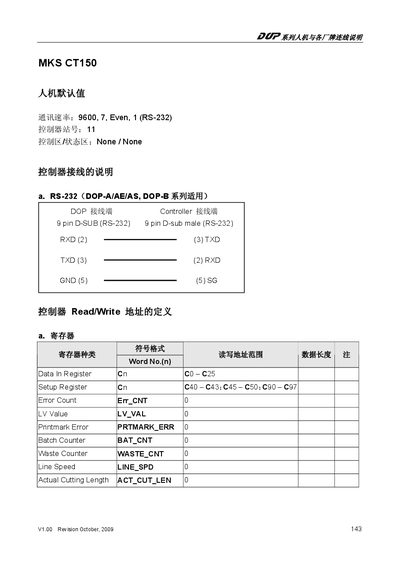
The MKS CT150 is a controller that communicates via an RS‑232 interface. It uses a 9‑pin D‑SUB male connector and supports a baud rate of 9600 with 7 data bits, even parity, and 1 stop bit.
The manual lists the controller's registers, error counters, and command set, including jog trim adjustments, start/stop control, and EEPROM storage functions. Each register is identified by its address and purpose, enabling configuration and monitoring of the device.
| Baud Rate | 9600 |
|---|---|
| Data Bits | 7 |
| Parity | Even |
| Stop Bits | 1 |
| Connector | 9‑pin D‑SUB male (RS‑232) |
| Document Revision | V1.00 October 2009 |
The controller uses a baud rate of 9600, 7 data bits, even parity, and 1 stop bit.
Use the START_STOP command to start or stop the controller.
The JOGTRIM_INC command increases the jog trim value.
The STR_EEPROM command writes data to the EEPROM.