
TOYO-OVG TOYO-OVG with V0M (MGV Type) M (MGV Type) Chinese user manual. This voltmeter is suitable for Y-Y OPEN DELTA system and GPT third winding is 190/3V or 110/3V system.
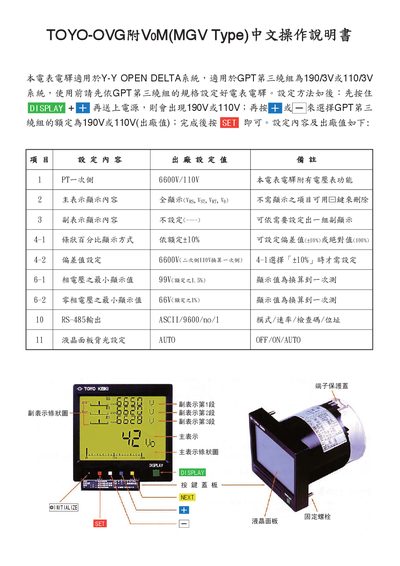
This manual explains how to configure the TOYO-OVG MGV power meter, including basic settings, main and secondary display options, and percentage adjustments. It also covers LCD backlight control, alarm reset, and wiring diagrams for input and output connections.
Key sections guide the user through RS‑485 communication parameters, voltage range selection, and minimum phase voltage settings, ensuring proper operation and accurate measurements. This manual is written in Japanese.
| RS-485 output | ASCII, 9600 baud, no parity, 1 stop bit |
|---|---|
| Maximum AC voltage/current | 250 V / 5 A |
| Maximum DC voltage/current (100 V range) | 100 V / 0.3 A |
| Maximum DC voltage/current (30 V range) | 30 V / 5 A |
| Supported voltage ranges | 110 V‑6600 V |
Press the NEXT key to enter the RS‑485 setting screen, then select the mode, baud rate, parity, and stop bits as needed.
Press the [RESET] key (marked with [+] and [Fill]) to reset the alarm and the maximum/minimum voltage values for each phase.
Enter the LCD backlight setting screen with the NEXT key and choose OFF, ON, or AUTO; AUTO mode turns the backlight off after a period of inactivity.