
S35B_M video door phone monitor product features: 4-wire connection method, 3.5-inch digital TFT LCD screen, electronic door bell sound, simultaneous communication.
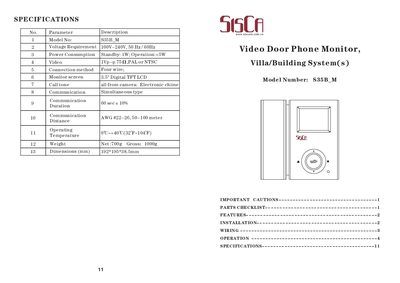
The S35B_M is a video door phone monitor designed for villa and building entry systems. It features a 3.5" digital TFT LCD screen, four‑wire connection, and supports two cameras with automatic switching.
This manual covers safety precautions, parts checklist, installation steps, wiring diagrams, operation instructions, menu settings, and technical specifications. It also explains how to manage recordings and adjust language preferences.
| Model No | $385B_M |
|---|---|
| Voltage Requirement | 100V‑240V, 50 Hz/60 Hz |
| Power Consumption | Standby: 1 W; Operation: <5 W |
| Video Output | 1 Vp‑p 75Q0, PAL or NTSC |
| Connection Method | Four wire |
| Monitor Screen | 3.5" Digital TFT LCD |
| Call Tone | Electronic chime |
| Communication Duration | 60 sec + 10 % |
| Communication Distance | AWG #22‑26, 50‑100 m |
| Operating Temperature | 0 °C ~ +40 °C |
| Weight | Net 700 g, Gross 1000 g |
| Dimensions | 192 × 195 × 38.5 mm |
Mount the bracket on the wall, drill a hole for the cables, connect the camera cables, attach the handset cord, secure the monitor on the bracket, plug in the AC power cord and turn the power switch on.
Use the UP/DOWN/ENTER keys to select the file, then press the # key to delete it.
In the Settings menu, select Language and choose Chinese, English, or Arabic.