
This document introduces the appearance, buttons, functions, and operation instructions of a multi-function MINI DV camera. The product has features such as remote control, night vision, motion detection, high-definition digital video recording, photography, audio recording, and network camera. It is suitable for home security, education, and daily life. The product is compact, practical, and easy to carry, and is favored by users.
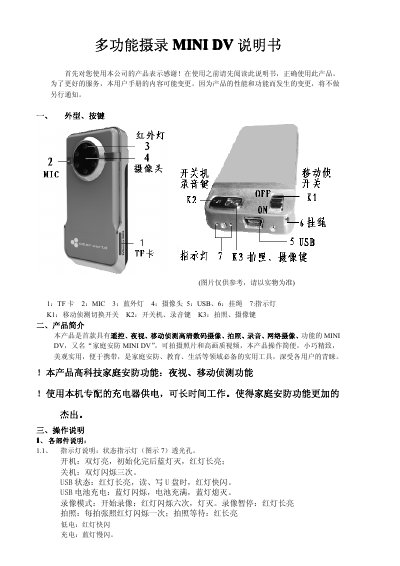
The Philips MINI DV is a compact, multi‑function security camera with remote control, night vision, motion detection, high‑definition video, photo, audio recording and network capabilities. It uses a TF card for storage and can be powered via USB or an external power source.
The manual explains the device’s buttons, indicators, mode switching, charging procedure, USB mass‑storage usage, remote control functions, and safety precautions, along with technical specifications such as video formats, battery capacity and operating environment. This manual is written in Chinese.
| Battery capacity | 890 mAh |
|---|---|
| Maximum storage | 16 GB microSD |
| Video resolution | 640×480, 720×480, 1280×960 |
| Video frame rate | 30 fps |
| Audio format | WAV |
| Operating temperature | -10 °C to 60 °C |
Press the K1 key to toggle between regular and motion‑detection mode; the device will start motion detection and the LEDs flash to indicate the mode.
The device supports a TF (microSD) card up to 16 GB.