
This document introduces the key functions of the car DVR, including high-definition interface, USB interface, hanging rope, 2-inch color LCD display, etc. It also introduces the installation of the bracket and the power supply methods. In addition, it describes the functions such as recording, taking photos, playing, as well as browsing and deleting files. Finally, it also introduces the steps of function setting and file download.
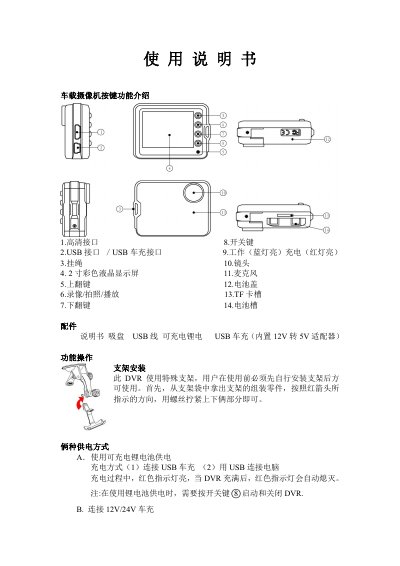
This manual describes how to mount the dash‑camera using the supplied special bracket and secure it with the provided screws. Two power options are supported: a rechargeable lithium‑ion battery (charged via the included USB car charger) or a 12 V/24 V car charger that steps down to 5 V.
Operating instructions cover recording modes (VGA, DI, HD), photo capture, playback, file deletion, and various settings such as resolution, frame rate, language, and loop recording. The device records to a TF card (up to 32 GB) and can output video via USB or HDMI for preview on a TV or monitor. This manual is written in Chinese.
| Recording resolution | VGA (640×480), DI (720×480), HD (1280×720) |
|---|---|
| Compression format | H.264 |
| Power supply | Rechargeable lithium battery / USB car charger (12 V/24 V → 5 V) |
| Supported TF card capacity | Up to 32 GB |
| Output interfaces | USB and HDMI |
| Display | 2‑inch color LCD |
Enter playback mode, stop the video, then long‑press the play button for 3 seconds to enter delete mode, select the files, and confirm with a short press of the play button.
Yes, loop recording is enabled by default; when the TF card is full, the device automatically overwrites the oldest files.