
Key facts
- Manuals
- 1
- Categories
- 1
- Languages
- ZH
- Last added
- 2012-03-14
Featured CARS摄像机 manuals
Philips 8-inch HD Car Camera User Manual
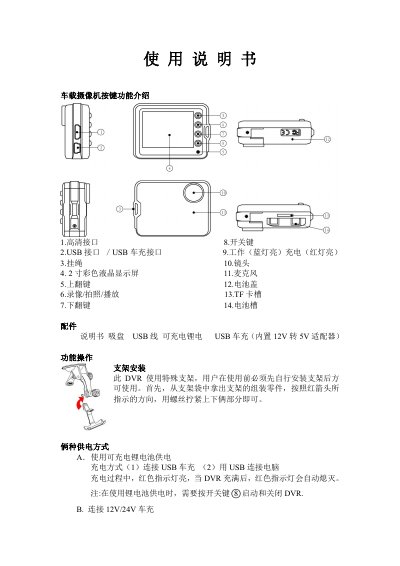
This manual describes how to mount the dash‑camera using the supplied special bracket and secure it with the provided screws. Two power options are supported: a rechargeable lithium‑ion battery (charged via the included USB car charger) or a 12 V/24 V car charger that steps down to 5 V.
Operating instructions cover recording modes (VGA, DI, HD), photo capture, playback, file deletion, and various settings such as resolution, frame rate, language, and loop recording. The device records to a TF card (up to 32 GB) and can output video via USB or HDMI for preview on a TV or monitor. This manual is written in Chinese.
Covers: Key Functions · Installation · Power Supply · Recording Modes · Photo Mode · Playback and File Management
Latest CARS摄像机 manuals
Philips 8-inch HD Car Camera User Manual
User Manual 3 pages · 170 KB · ZHThe Philips 8-inch HD car camera user manual explains installation, operation, settings, and technical specifications.
Which document do I need?
User Manual
Day-to-day operation, settings and troubleshooting. Start here if the product is already set up.
Questions answered in CARS摄像机 manuals
How can I delete recorded files from the dashcam?
Enter playback mode, stop the video, then long‑press the play button for 3 seconds to enter delete mode, select the files, and confirm with a short press of the play button.
Does the dashcam support loop recording?
Yes, loop recording is enabled by default; when the TF card is full, the device automatically overwrites the oldest files.