
JMC-228 is a versatile electronic scale with main and sub display windows and various parameter settings. Users can set parameters through buttons and view current input weight or settings through the main and sub display windows. The scale also has a forced zero function and communication function.
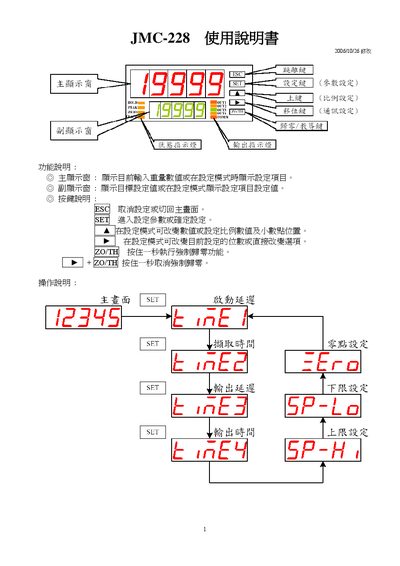
This manual describes the functions and operation of the JMC-228, including how to view current weight values, set target values, and use the various filter modes. It also explains the user interface, key functions, and safety notes for proper use.
The document details parameter configuration such as dynamic range, offset, zero‑time, input limits, and communication settings (Modbus RTU/ASCII, baud rates, parity, data bits). It includes wiring diagrams for external connections and instructions for resetting the device to factory defaults. This manual is written in Japanese.
| Dynamic input range | 0.0001‑1.9999 |
|---|---|
| Offset range | -9999 to 9999 |
| Zero‑time (auto zero‑track) | 0‑9.9 sec |
| Input upper limit | 10‑99999 |
| Power supply voltage | 100‑340 V |
| Supported baud rates | 19200, 9600, 4800, 2400 bps |
Select the desired parameter, press the SET key for a few seconds, change the value, and confirm the change as described in the manual.
Press the ESC key to return to the main screen.