
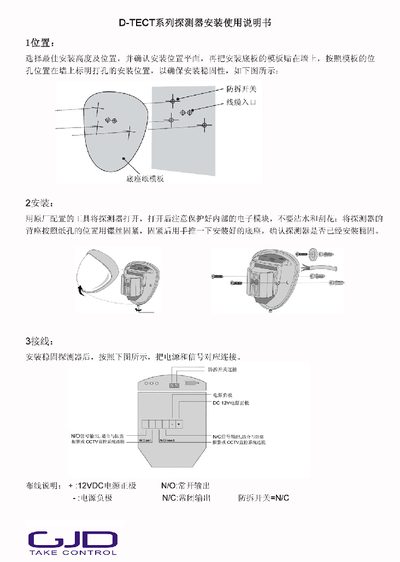
The guide explains how to select the optimal mounting height and position, mark and drill mounting holes, and securely attach the detector base using the provided template and fasteners. After mounting, it details the wiring connections for 12 V DC power, signal outputs, and the anti‑tamper switch.
It also covers the power‑on self‑test, programming procedures using the built‑in programming key, and how to adjust detection distance, pulse count, and LED status. Final steps include securing the outer housing and confirming the installation. This manual is written in Chinese.
| Detection distance range | 10 m – 50 m (default 30 m) |
|---|---|
| Default detection distance | 30 m |
| Pulse count options | 1‑2 |
| LED control | ON / OFF |
| Power supply | 12 V DC |
| Signal outputs | N/O normally open, N/C normally closed |
Enter programming mode by pressing the programming key, then use the rapid LED flashes to select the desired distance (e.g., 20 m) and confirm with two quick flashes.
Connect +12 VDC to the positive terminal, the negative terminal to ground, N/O to the normally open output, N/C to the normally closed output, and the anti‑tamper switch to N/C.
The LED can be turned OFF or ON via the programming table entry "LED关/开".