
This document introduces the part names and product specifications of the C652 watch, including time accuracy, display functions, alarm, stopwatch, countdown, and domain setting functions. It also provides operation guidelines for 0 position confirmation and correction, full reset, time adjustment method, calendar method, and alarm usage method.
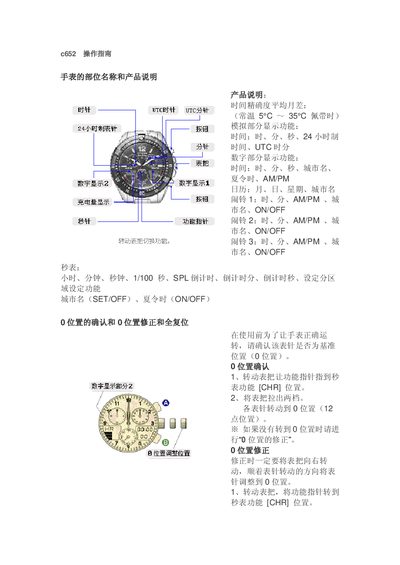
This manual provides step‑by‑step instructions for using the C652 smartwatch. It covers time and date settings, multiple alarms, stopwatch, countdown timer, and regional time‑zone configuration, as well as how to adjust the analog and digital displays.
Additional sections describe the zero‑position reset, full reset, power‑saving functions, and battery‑level indication, helping users maintain accurate timekeeping and optimal battery performance. This manual is written in Chinese.
Turn the crown to the CHR (seconds) position, pull the crown out two clicks, and rotate until all hands point to the 12 o’clock (zero) position, then push the crown back.
Turn the crown to the AL‑1/AL‑2/AL‑3 position, press the button to select the city, pull the crown out two clicks, adjust the time, and press the button to switch the alarm ON or OFF.
The remaining charge of the rechargeable battery is displayed in the digital portion of the watch face.