
Digital Camera FDC01 is a digital camera with a built-in rechargeable battery that can be charged by connecting it to a computer using a USB cable. The camera has various shooting modes, including normal, monochrome, noise, and vivid. Users can operate the camera through the LCD display screen. It is important to fully charge the battery before initial use and to follow the instructions and precautions when using and connecting the camera.
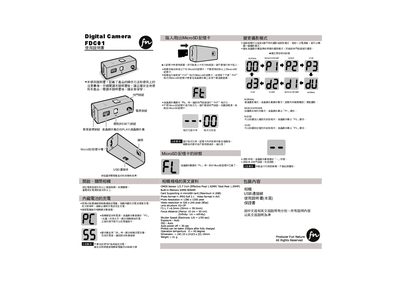
This manual explains how to operate the FDC01 digital camera, including power on/off, button functions, charging the built‑in battery via USB, and inserting a MicroSD card. It also describes the various shooting modes such as Normal, Monochrome, Noise, and Vivid, and how to select them using the mode button.
Technical details are listed, covering the CMOS sensor, lens specifications, memory capacity, supported file formats, and physical dimensions. Safety precautions and proper handling instructions are included to ensure reliable use of the camera. This manual is written in Chinese.
| CMOS Sensor | 1/2.7 inch, 1.92MP effective, 1.95MP total |
|---|---|
| Built‑in Memory | 64 MB SDRAM |
| Supported Memory Card | MicroSD up to 2 GB, FAT format |
| Photo Format | JPEG |
| Video Format | AVI |
| Photo Resolution | 1280 × 1200 px |
| Video Resolution | 320 × 240 px |
| Lens Structure | 1G+2P |
| Focal Length | 6‑5 mm (35 mm equivalent 39.5 mm) |
| Focus Distance | 15 cm to infinity |
| Shutter Speed | 1/176 s – 1/1750 s |
| Auto Power‑Off | 30 seconds |
| Operating Temperature | 0 °C – 40 °C |
| Dimensions | 53 × 23 × 19 mm (W × H × D) |
| Weight | 219 g |
Press and hold the power button for more than five seconds to turn the camera on; repeat the same action to turn it off.
The camera supports MicroSD cards up to 2 GB formatted with FAT; cards larger than 2 GB are not supported.