
DCCP100U-H series power LED driver module has ultra wide input voltage range, high precision constant current control, high efficiency and high reliability, high power density design, wide working temperature, natural cooling mode, adjustable output current, complete full automatic electronic protection function and other features.
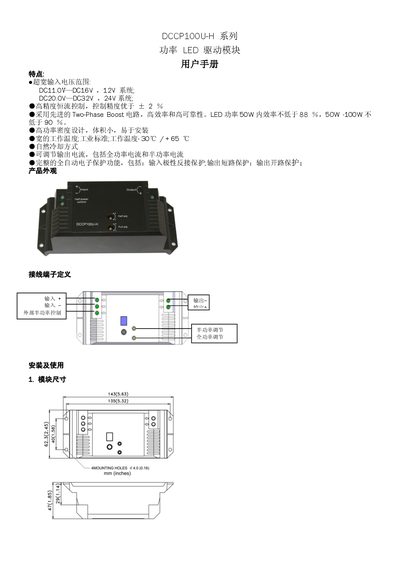
The Philips DCCP100U-H series power LED driver module provides a wide input voltage range (11‑16 V for 12 V systems, 20‑32 V for 24 V systems) and high‑precision constant‑current control with ±2 % accuracy. It features a two‑phase boost circuit for high efficiency, natural cooling, and comprehensive protection functions such as reverse polarity, short‑circuit and open‑circuit protection.
The manual explains the physical layout, terminal definitions, wiring procedures, and how to adjust half‑power and full‑power output using the dedicated knobs. It also includes connection guidelines for power LEDs, power supplies, and solar controllers, as well as a detailed technical specifications table for both the 12 V/50 W and 24 V/100 W variants. This manual is written in Chinese.
| Rated Voltage | 12 V (DCCP100U-H), 24 V (DCCP100U-F) |
|---|---|
| Operating Voltage Range | 11‑16 V (12 V version), 20‑32 V (24 V version) |
| Input Power | 10‑50 W (12 V), 10‑120 W (24 V) |
| Input Current | 0.5‑5.5 A |
| Output Voltage | 15‑40 V (12 V version), 30‑40 V (24 V version) |
| Output Current | 0.3‑3.5 A (12 V), 0.3‑4 A (24 V) |
| Current Accuracy | ± <2 % |
| Typical Efficiency | 90‑93 % |
| Operating Temperature | -30 °C to +65 °C |
Connect the external half‑power control terminal to a positive voltage to enable half‑power mode, then turn the half‑power adjustment knob with a flat‑head screwdriver until the desired output is reached.
Connect the external half‑power control terminal to negative (ground), which puts the module in full‑power mode, and adjust the full‑power adjustment knob with a flat‑head screwdriver to reach the required current.
The 12 V version accepts an input voltage from 11 V to 16 V.
The module includes reverse polarity protection, output short‑circuit protection, and output open‑circuit protection.