
CallMe is a web-based phone that combines text, voice, and video communication. It is integrated with China Telecom's VOIP network to provide cost-saving telephone services. Its main features include video calling, text messaging, and file transfer. It offers a user-friendly interface and helps users save on phone expenses.
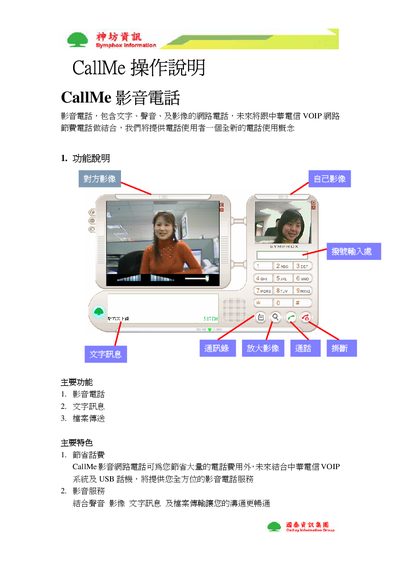
This manual introduces the CallMe video telephone, describing its core functions such as video calling, text messaging, and file transfer. It also highlights key benefits like cost‑saving phone calls and integrated VOIP services.
Detailed instructions cover user login, searching and adding contacts, creating groups, handling video windows, using the MailMe video‑mail feature, recording and sending video clips, and scheduling or joining meetings with desktop sharing and host transfer. This manual is written in Chinese.
Press the red call button.
Press the search contact button, enter the personal account, portable code or display name, then press the search button.
Press the red end button.