
Key facts
- Manuals
- 1
- Languages
- ZH
- Last added
- 2012-02-21
Featured callme影音电话 manuals
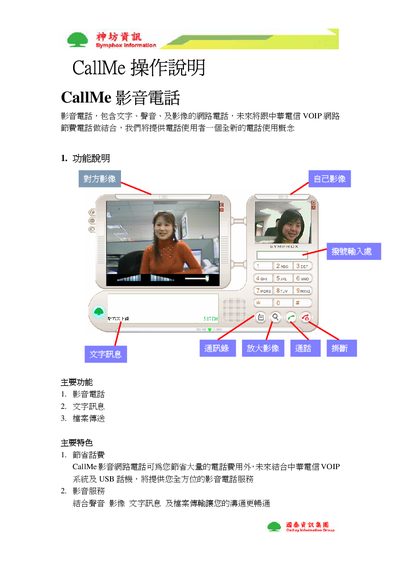
CallMe Video Telephone User Manual
This manual introduces the CallMe video telephone, describing its core functions such as video calling, text messaging, and file transfer. It also highlights key benefits like cost‑saving phone calls and integrated VOIP services.
Detailed instructions cover user login, searching and adding contacts, creating groups, handling video windows, using the MailMe video‑mail feature, recording and sending video clips, and scheduling or joining meetings with desktop sharing and host transfer. This manual is written in Chinese.
Covers: 功能说明 · 主要功能与特色 · 登录与帐号管理 · 搜索与添加联系人 · 群组管理 · 影像操作
Latest callme影音电话 manuals
CallMe Video Telephone User Manual
User Manual 12 pages · 655 KB · ZHThe CallMe Video Telephone User Manual explains the device’s features, operation steps, and meeting functions.
Which document do I need?
User Manual
Day-to-day operation, settings and troubleshooting. Start here if the product is already set up.
Questions answered in callme影音电话 manuals
How can you add a contact?
Press the search contact button, enter the personal account, portable code or display name, then press the search button.