
Hyper Card is a dual-SIM card holder that can be inserted into the phone to allow the phone to use two SIM cards simultaneously. It is easy to operate and does not require modification of the original card holder.
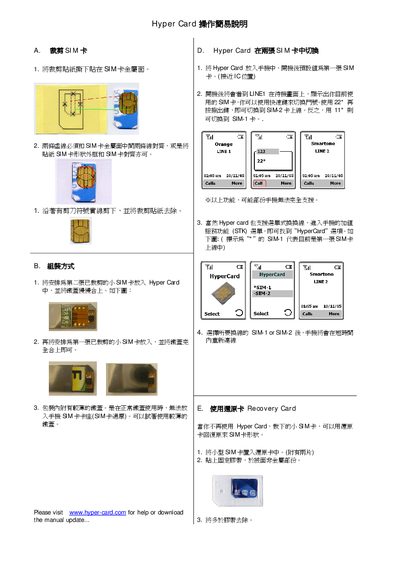
The Hyper Card allows you to insert two SIM cards and switch between them on a compatible phone. First, place the SIM stickers on the metal side of each SIM, then insert the SIMs into the Hyper Card slots as described in sections A and B. After closing the card, the phone will recognize the active SIM.
You can switch between SIM‑1 and SIM‑2 using the designated shortcut keys (e.g., *22* for SIM‑2 and *11* for SIM‑1) or via the phone's STK menu. The card also includes a Recovery Card function to restore a previously used SIM if the Hyper Card is no longer needed. This manual is written in Chinese.
| Supported SIM slots | Dual SIM (SIM‑1 and SIM‑2) |
|---|---|
| Switching method | Shortcut keys *22* for SIM‑2, *11* for SIM‑1 |
After the phone powers on, press the shortcut key *22* to switch to SIM‑2 or *11* to switch back to SIM‑1.