
This is a ECP-8180VE motherboard quick installation guide, which mainly introduces the motherboard layout, jumpers and interfaces, jumper settings and pin definitions and other contents.
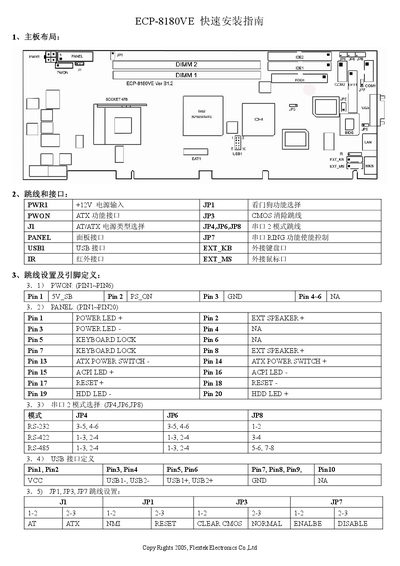
This manual describes the connector pin assignments and wiring details for the Flextek ECP-8180VE board. It is intended for technicians performing installation, troubleshooting, or service tasks.
The document lists power pins (e.g., +12 V on JP1, 5 V_SB on Pin 1), panel header signals (POWER LED, RESET, HDD LED, etc.), serial interfaces (RS‑232, RS‑422, RS‑485) and USB header pinouts. It also includes jumper settings for ATX power control and CMOS reset.
| Power Input Voltage | +12 V |
|---|---|
| USB Header Signals | USB1‑, USB2‑, USB1+, USB2+, GND |
| ATX Power Switch Pins | - on Pin 13, + on Pin 14 |
| RS‑232 Pin Pairs | 3‑5, 4‑6 |
POWER LED + is on Pin 2 and POWER LED – is on Pin 3.
ATX POWER SWITCH – is on Pin 13 and ATX POWER SWITCH + is on Pin 14.
RS‑232 uses pin pairs 3‑5 and 4‑6 on the connector.
USB1‑, USB2‑, USB1+, USB2+, and GND are assigned to the USB header pins as listed.