
This document is an installation guide for Ubuntu operating system, providing detailed steps from inserting the installation disc to completing the installation process.
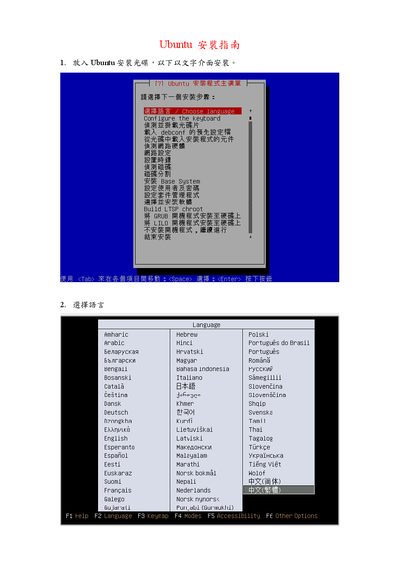
The guide walks you through booting from the Ubuntu installation CD, selecting the installation language, and choosing a keyboard layout such as US. It then explains how the installer automatically detects network connections and how to configure them manually if detection fails.
Next, the document covers disk partitioning—automatic partitioning will completely reformat the selected hard drive, while manual partitioning lets you define root and swap partitions. It continues with creating a user account and password, installing default packages, and setting the system time zone (optionally using UTC). This manual is written in Chinese.
| Supported keyboard layout | US (American) |
|---|---|
| Hard‑disk handling | Automatic partitioning erases the entire disk |
On the keyboard layout screen choose the US (American) layout.
The installer will completely reformat the selected hard drive, erasing all data.
During installation you can choose to set the time zone to UTC or another region.