
Key facts
- Manuals
- 1
- Languages
- ZH
- Last added
- 2012-01-29
Featured Ubuntu manuals
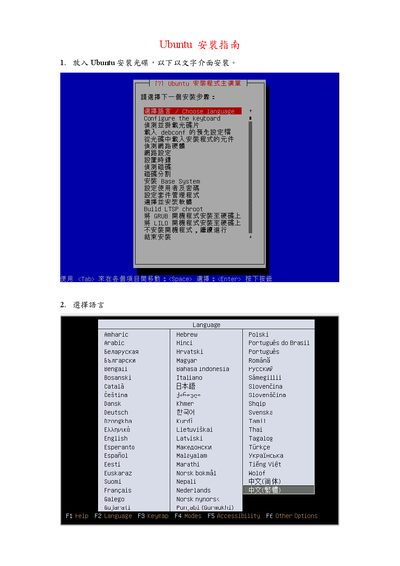
Ubuntu 8.10 Installation Guide
The guide walks you through booting from the Ubuntu installation CD, selecting the installation language, and choosing a keyboard layout such as US. It then explains how the installer automatically detects network connections and how to configure them manually if detection fails.
Next, the document covers disk partitioning—automatic partitioning will completely reformat the selected hard drive, while manual partitioning lets you define root and swap partitions. It continues with creating a user account and password, installing default packages, and setting the system time zone (optionally using UTC). This manual is written in Chinese.
Covers: Boot from CD · Language selection · Keyboard layout selection · Network detection · Disk partitioning · User account setup
Latest Ubuntu manuals
Ubuntu 8.10 Installation Guide
Installation Guide 12 pages · 383 KB · ZHStep‑by‑step instructions for installing Ubuntu 8.10 using the text‑mode installer.
Which document do I need?
Installation Guide
Mounting, wiring and first power-up. Read it before the hardware goes in.
Questions answered in Ubuntu manuals
How do I select the keyboard layout during installation?
On the keyboard layout screen choose the US (American) layout.
What happens if I choose automatic partitioning?
The installer will completely reformat the selected hard drive, erasing all data.