
Instructions for use
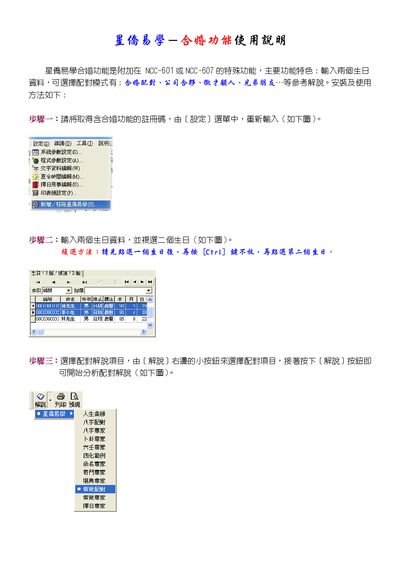
The marriage matching function is an optional feature that can be added to the NCC-601 or NCC-607 devices. It allows users to input two birth dates and select a matching mode such as marriage pairing, business partnership, recruitment consulting, or friends.
The manual provides step‑by‑step instructions: register the function with a code, input the two birth dates, choose the desired matching explanation, and start the analysis. It also covers printing and preview options. This manual is written in Chinese.
| Supported models | NCC-601, NCC-607 |
|---|
Enter the registration code from the Settings menu as shown in the manual.
Select the first birthday, hold the Ctri key, then select the second birthday.
After choosing a matching project, press the Explanation button to begin the analysis.