
Key facts
- Manuals
- 1
- Languages
- ZH
- Last added
- 2012-01-15
Featured 星侨易 manuals
Xingqiao Yi NCC-601/NCC-607 Marriage Matching Function User Manual
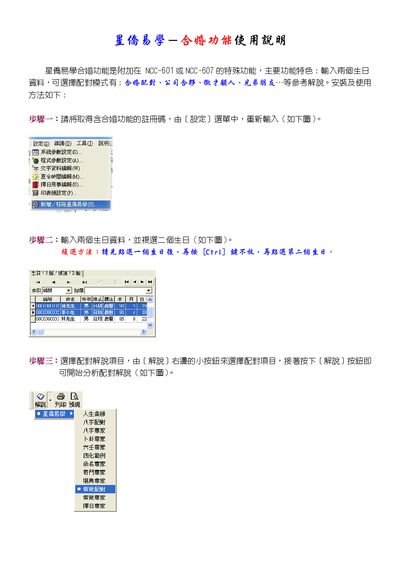
The marriage matching function is an optional feature that can be added to the NCC-601 or NCC-607 devices. It allows users to input two birth dates and select a matching mode such as marriage pairing, business partnership, recruitment consulting, or friends.
The manual provides step‑by‑step instructions: register the function with a code, input the two birth dates, choose the desired matching explanation, and start the analysis. It also covers printing and preview options. This manual is written in Chinese.
Covers: Installation and usage method · Step 1: Register the function · Step 2: Input two birth dates · Step 3: Select matching explanation project · Printing and preview
Latest 星侨易 manuals
Xingqiao Yi NCC-601/NCC-607 Marriage Matching Function User Manual
User Manual 1 pages · 72 KB · ZHThis manual explains how to install and use the marriage matching function on NCC-601 or NCC-607 devices.
Which document do I need?
User Manual
Day-to-day operation, settings and troubleshooting. Start here if the product is already set up.
Questions answered in 星侨易 manuals
How do I register the marriage matching function?
Enter the registration code from the Settings menu as shown in the manual.
From: Xingqiao Yi NCC-601/NCC-607 Marriage Matching Function User Manual
How do I input two birth dates?
Select the first birthday, hold the Ctri key, then select the second birthday.
From: Xingqiao Yi NCC-601/NCC-607 Marriage Matching Function User Manual