
ST40-12A1 Liquid Crystal Display TV User Manual, includes product features and usage methods.
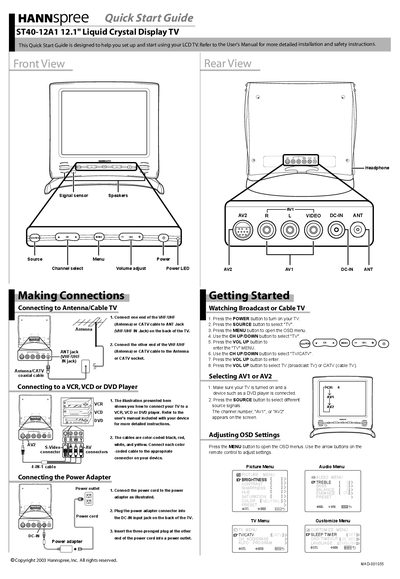
The guide provides step‑by‑step instructions for connecting the TV to an antenna or cable source, attaching audio/video devices, and powering the unit. It includes diagrams of the rear panel connectors and color‑coded cable tips.
Basic operation instructions cover turning the TV on, selecting the source (TV, AV1, AV2), and adjusting on‑screen display settings such as picture and audio menus.
| Screen size | 12.1 inches |
|---|
Press the POWER button on the remote control or TV panel.
Press the MENU button to open the OSD menus, then use the arrow buttons to navigate the Picture and Audio menus.