
Key facts
- Manuals
- 1
- Languages
- EN
- Last added
- 2012-01-05
Featured ST40-12A1 manuals
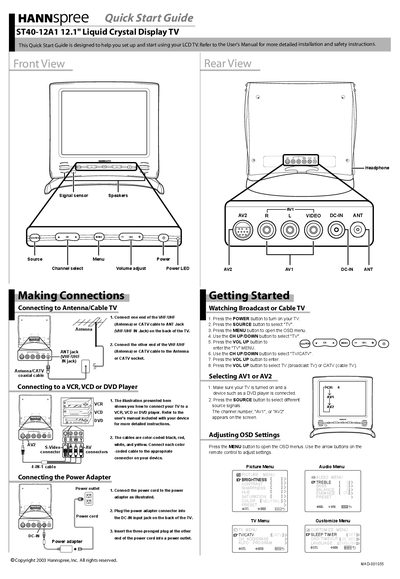
ST40-12A1 12.1" Liquid Crystal Display TV quick Reference Manual
The guide provides step‑by‑step instructions for connecting the TV to an antenna or cable source, attaching audio/video devices, and powering the unit. It includes diagrams of the rear panel connectors and color‑coded cable tips.
Basic operation instructions cover turning the TV on, selecting the source (TV, AV1, AV2), and adjusting on‑screen display settings such as picture and audio menus.
Covers: Making Connections · Connecting to Antenna/Cable TV · Connecting the Power Adapter · Getting Started · Watching Broadcast or Cable TV · Selecting AV1 or AV2
Latest ST40-12A1 manuals
ST40-12A1 12.1" Liquid Crystal Display TV quick Reference Manual
Quick Start Guide 2 pages · 6 MB · ENThis quick start guide shows how to set up and begin using the Hannspree ST40-12A1 12.1" LCD TV.
Which document do I need?
Quick Start Guide
The shortest path to a working setup, usually only a few pages.
Questions answered in ST40-12A1 manuals
How do I power the TV on?
Press the POWER button on the remote control or TV panel.
From: ST40-12A1 12.1" Liquid Crystal Display TV quick Reference Manual
How can I adjust picture and audio settings?
Press the MENU button to open the OSD menus, then use the arrow buttons to navigate the Picture and Audio menus.
From: ST40-12A1 12.1" Liquid Crystal Display TV quick Reference Manual