
USB RFID contactless card reader is a card reading device that connects to a computer via a USB interface. It can read 125KHz ASK type Transponder. It is suitable for systems that require identity verification such as access control, time attendance, and check-in. Users can develop their own applications using the provided sample program, driver, and protocol. The communication format is set to 9600, n, 8, 1.
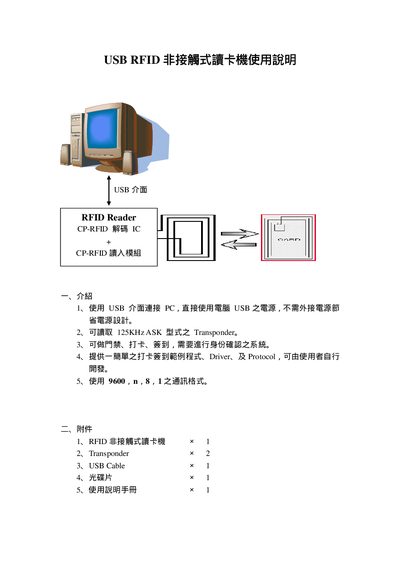
The USB RFID card reader connects to a PC via a USB interface and does not require an external power supply. It reads 125 kHz ASK transponders and can be used for door access, time‑attendance, and sign‑in systems. The package includes the reader, two transponders, a USB cable, a CD with drivers and sample programs, and this manual.
The manual guides you through driver installation from the CD, COM port configuration, communication settings (9600 bps, N,8,1), and the optional simple login system with sample VB6 source code. It also describes how to interpret read data, clear logs, and provides the RS232 pinout for the alternate interface. This manual is written in Chinese.
| Supported transponder frequency | 125 kHz ASK |
|---|---|
| Communication baud rate | 9600 bps, N,8,1 |
| Interface | USB (optional RS232) |
| RS232 pinout | PIN1 DCSV, PIN3 RS232‑RX, PIN4 RS232‑TX, PIN8 GND |
Insert the CD, open the Driver folder, and follow the on‑screen steps: click “Next”, select the appropriate driver file, and finish the installation.
Set the serial communication to 9600 bps, no parity, 8 data bits, 1 stop bit.
Press the “Clear” button on the software to remove the displayed card number, name, and status.