
This document describes the features of Honeywell Honeywell/Commercial Switch-Sensor, including installation options of high-profile and flush panel, temperature range, and button options.
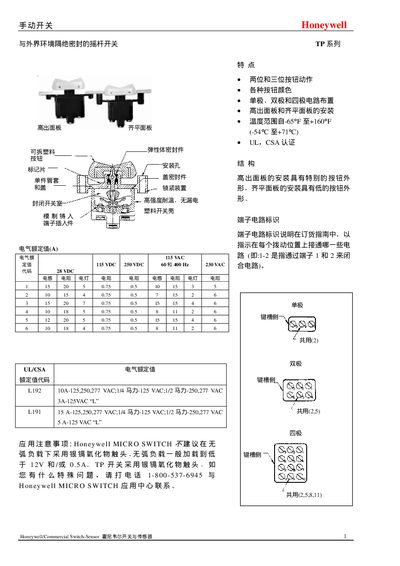
The Honeywell TP series switches are available in single‑pole, double‑pole, and four‑pole configurations with high‑profile and low‑profile mounting options. The manual provides detailed features, terminal wiring conventions, and UL/CSA certification information.
Installation dimensions, wiring diagrams, and terminal connection tables are included to help users correctly mount the switches and wire them to control circuits. Temperature operating limits and voltage ratings are also specified. This manual is written in Chinese.
| Rated Voltage (AC) | 115 VAC |
|---|---|
| Rated Voltage (DC) | 115 VDC / 250 VDC |
| Frequency | 60 Hz / 400 Hz |
| Auxiliary Voltage | 28 VDC |
| Temperature Range | -6 °C to +71 °C |
| UL/CSA Certification | UL, CSA |
The TP series switches operate from –6 °C up to +71 °C.
The switches are certified to UL and CSA standards.
Both high‑profile (raised) and low‑profile (flat) panels are supported, with dimensions provided for each.