
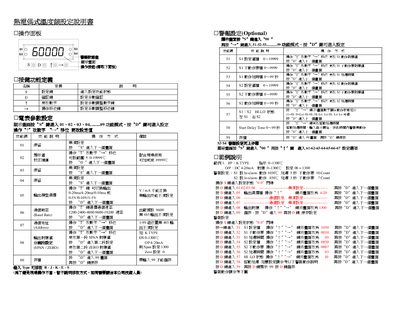
The guide describes the operation panel of the tester, how to adjust numeric values, set alarm thresholds, and configure action delays. It also explains how to select output types such as 0.20 mA, 4–20 mA, or 0–10 mA.
Communication settings are covered, including baud‑rate selection (1200‑19200 bps, default 9600) and address configuration. The document provides command codes and data formats for reading and writing controller parameters, as well as alarm action behavior. This manual is written in Chinese.
| Action delay range | 0–99 seconds |
|---|---|
| Output type options | 0.20 mA / 4–20 mA / 0–10 mA |
| Supported baud rates | 1200, 2400, 4800, 9600, 19200 |
| Default baud rate | 9600 |
Enter the start delay time (0–99 seconds) using the D key on the panel.
You can select 1200, 2400, 4800, 9600, or 19200 bps; the factory default is 9600 bps.
Choose the desired output type (0.20 mA, 4–20 mA, or 0–10 mA) from the output selection menu.