
This PDF file is the user manual of the Yamaha PSR-E373 digital synthesizer
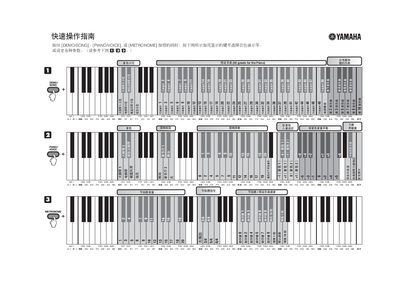
The guide explains how to hold the DEMO/ASONG and PIANONOICE buttons while pressing highlighted keys to select tone demos, preset songs, and other functions. It also describes using the METRONOME button with highlighted keys to set tempo in 0.2 Hz increments.
Additional instructions cover loading songs from a computer, using preset song collections (e.g., “50 greats for the Piano”), and adjusting parameters such as voice, reverb depth, and dual‑tone volume. The document includes diagrams of the highlighted keys and notes on the piano’s control layout. This manual is written in Chinese.
Hold the DEMO/ASONG and PIANONOICE buttons together, then press the highlighted key shown in the guide.