
This document describes the features and characteristics of the Dell™ Dimension™ 8300 series computer, including hard drive indicator lights, power button, headphone connector, USB 2.0 connectors, etc.
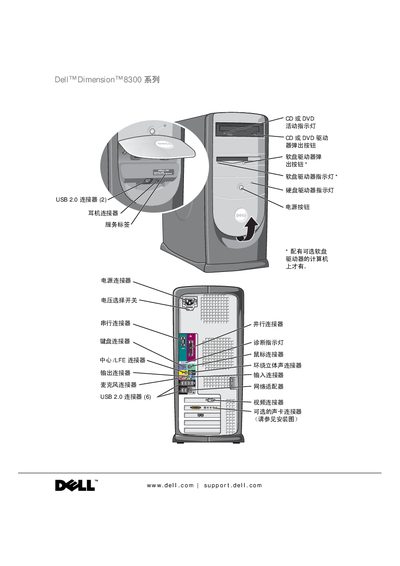
This manual covers the physical layout of the Dell Dimension 8300, including front and rear connectors such as USB 2.0 ports, video and audio jacks, and power button. It explains how to install and configure components like hard drives, memory, and optional devices, and provides step‑by‑step instructions for setting up printers, network adapters, and Internet connections.
The guide also includes extensive troubleshooting sections, safety warnings, diagnostic procedures, and instructions for using Dell’s diagnostic program. Users can find solutions for common hardware issues, software compatibility, and system restoration, as well as detailed procedures for adding or replacing internal parts. This manual is written in Chinese.
| USB 2.0 connectors (front) | 2 |
|---|---|
| USB 2.0 connectors (rear) | 6 |
| Audio (surround sound) connector | present |
It indicates a possible risk of property loss, personal injury, or death.
Refer to the "Copy CD and DVD" section on page 25 for step‑by‑step instructions.
The Dell Diagnostic Program is described in the "Dell Diagnostic Program" section starting on page 52.