
Key facts
- Manuals
- 209
- Models
- 62
- Languages
- EN
- Last added
- 2026-09-29
Microsemi models by category
Featured Microsemi manuals
Microsemi FlashPro5 Device Programmer Quickstart Card
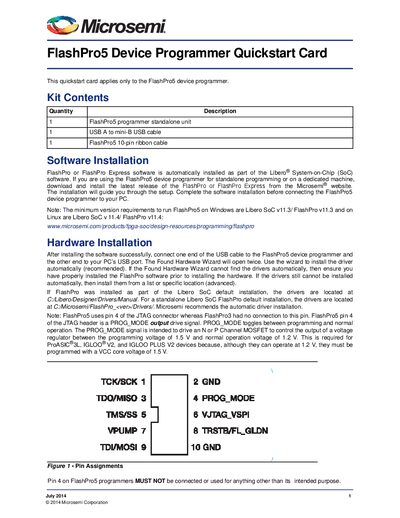
This quickstart card is intended for users of the FlashPro5 device programmer. It lists the kit contents, explains how to install the FlashPro or FlashPro Express software, and shows how to connect the programmer to a PC via USB.
The guide also details the required JTAG pin configuration, voltage requirements, and common issues such as an unlit On LED. Documentation resources, technical support contacts, and regulatory compliance information are included.
Covers: Kit Contents · Software Installation · Hardware Installation · Pin Assignments · Common Issues · Documentation Resources
Latest Microsemi manuals
Microsemi FlashPro5 Device Programmer Quickstart Card
Quick Start Guide 2 pages · 161 KB · ENThe Microsemi FlashPro5 quickstart card provides setup steps, kit contents, software and hardware installation, pin assignments, and troubleshooting tips.
Microsemi 240 amp schottky rectifier HS24515 handbook
Microsemi 240 amp schottky rectifier HS24380-HS243100 handbook(1)(1)
Microsemi 240 amp schottky rectifier HS24380-HS243100 handbook1
Microsemi HS24230 handbook
Microsemi HS24135 - HS24145 handbook
Microsemi HS24035 - HS24045 handbook
Microsemi FST4035 - FST4045 handbook
Microsemi FST3230 handbook
Microsemi FST3150 - FST3160 handbook
Microsemi FST3135 - FST3145 handbook
Microsemi FST31180 - FST31200 handbook
Microsemi FST31120 - FST31150 handbook
Microsemi FST31100 handbook
Microsemi FST3060 handbook
Which document do I need?
Quick Start Guide
The shortest path to a working setup, usually only a few pages.
Questions answered in Microsemi manuals
What software is required for the FlashPro5 programmer?
You need the FlashPro or FlashPro Express software, which is installed automatically as part of the Libero SoC software package.
What should I do if the On LED does not light up?
The driver may not have installed correctly; reinstall or troubleshoot the driver installation as described in the FlashPro software guide.