
Key facts
- Manuals
- 17
- Models
- 1
- Categories
- 1
- Languages
- EN · FI · JA · ZH
- Last added
- 2026-09-29
Buffalo models by category
Featured Buffalo manuals
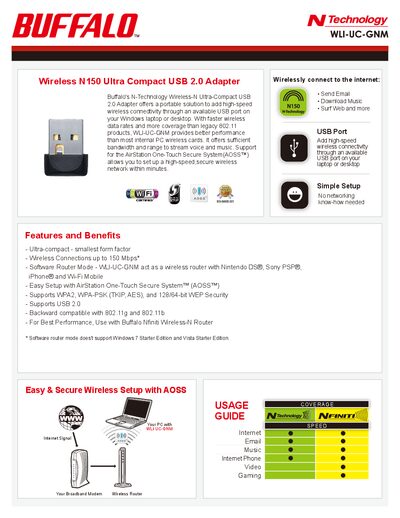
Buffalo WLI-UC-GNM Wireless-N Ultra-Compact USB 2.0 Adapter Product Leaflet
The Buffalo WLI-UC-GNM is an ultra‑compact USB 2.0 adapter that adds high‑speed Wireless‑N (up to 150 Mbps) to laptops or desktops. It supports AOSS for one‑touch secure setup and works with a range of devices such as Nintendo DS®, Sony PSP® and iPhone®.
Key specifications include IEEE 802.11n/g/b compliance, USB 2.0 interface, 1 × 1 SISO antenna, dimensions of 16 × 20 × 9 mm, weight of 3 g, and support for Windows 7, Vista and XP. The adapter also offers WPA2‑PSK, WPA‑PSK and WEP security options.
Covers: Features and Benefits · Usage Guide · Specifications · About Buffalo
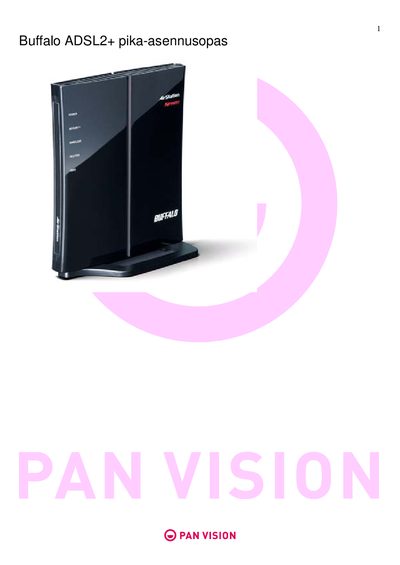
buffalo adsl2+ pika-asennusopas Manual
The guide walks you through the physical installation of the WHR‑G300N router, including connecting the DSL cable, Ethernet cable, and power adapter. It also explains how to start the guided installation from the supplied CD and how to perform a manual installation using a web browser.
After the hardware is set up, the document details wireless configuration, showing where to find the default SSID and encryption key on the router label, how to change wireless settings, and how to connect devices using Windows XP or Windows 7. It also lists required ISP parameters such as VPI/VCI values and connection types.
Covers: Reitittimen ohjattu asennus · Reitittimen asennus · Reitittimen asetukset · Langaton verkko - asetukset · Langattomaan verkkoon yhdistaminen · Licensing Agreement
BUFFALO MOS-S230F Manual
This manual introduces the MO‑disk drive M5‑S230F, describing safety precautions such as avoiding electric shock, fire hazards, and improper handling. It emphasizes the need to follow manufacturer warnings, keep the device away from liquids, strong magnetic fields, and children.
Installation and operation sections cover proper power‑off procedures, connector handling, and the requirement to remove the MO disk before moving the unit. Maintenance advice includes regular lens cleaning, static discharge precautions, and keeping ventilation clear. Legal and warranty notices are also included. This manual is written in Japanese.
Covers: Introduction · Safety Instructions · Installation Guide · Operation · Maintenance · Legal Notice
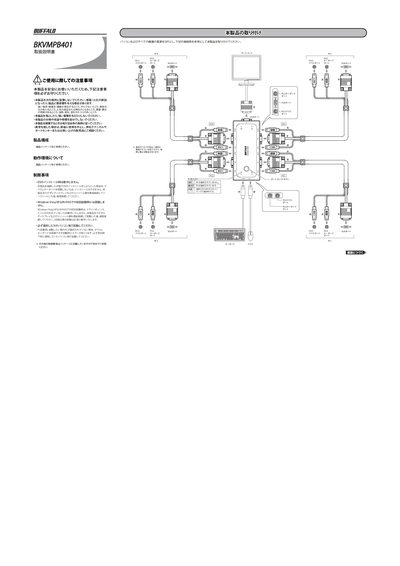
Buffalo BKVMPB401 Operating Instructions
This document provides safety guidelines and installation steps for the Buffalo BKVMPB401 KVM switch, including warnings about placement, handling, and disposal. It also describes the required connections for PS/2 keyboard, PS/2 mouse and VGA display ports.
The manual details how to switch between 2‑4 connected PCs using the Scroll Lock key, how to use the auto‑scan mode (8‑second interval), and offers troubleshooting tips for keyboard/mouse issues, display problems, and warranty contact information. This manual is written in Japanese.
Covers: Safety Precautions · Installation · Operation · Auto Scan Mode · Troubleshooting · Contact Information
Latest Buffalo manuals
Buffalo WLI-UC-GNM Wireless-N Ultra-Compact USB 2.0 Adapter Product Leaflet
Product Leaflet 2 pages · 318 KB · ENThe Buffalo WLI-UC-GNM Ultra-Compact USB 2.0 Adapter provides up to 150 Mbps wireless N connectivity with WPA2 security and easy AOSS setup.
BUFFALO GX-DVI/U2B-AP Quick Setup Guide
This document describes the installation and driver installation steps for the GX-DVI/U2B-AP product. The product can connect a computer to up to 6 monitors and provides digital RGB output.
BUFFALO HD-PEBU2 MiniStation quick user manual
This document is a MiniStation setup guide, which includes product features, usage methods and installation methods
BUFFALO WCA-G quick user manual
This is a quick setup guide for Buffalo Wi-Fi Gamers Access Point. It introduces the product's use methods and features.
BUFFALO WLE-DAH user manual
This is a PDF file. It is the user manual for WLE-DAH antenna. This antenna is a directional antenna with high sensitivity. It can be mounted on the wall and connected to AirStation.
buffalo adsl2+ pika-asennusopas Manual
Quick Start Guide 17 pages · 4.7 MB · FIThis Buffalo WHR-G300N quick start guide provides step‑by‑step instructions for installing and configuring the ADSL2+ router.
BUFFALO BSGPCP1202 Manual
BUFFALO MOS-S230F Manual
User Manual 28 pages · 237 KB · JAThe Melco S230F MO disk drive hardware manual provides safety guidelines, installation steps, and operating instructions.
Buffalo BKVMPB401 Operating Instructions
User Manual 2 pages · 679 KB · JAThe manual explains safety precautions, installation, switching, auto‑scan mode and troubleshooting for the Buffalo BKVMPB401 KVM switch.
Melco MO-C640U2 User Manual
User Manual 40 pages · 1 MB · JAThe Melco MO-C640U2 user manual provides safety guidelines, setup steps, and handling instructions for the USB MO disk drive.
Melco LGH-M5P/M8 Hardware Manual
User Manual 2 pages · 429 KB · JAHardware manual for the Melco LGH-M5P/M8 10BASE‑T repeater hub, covering installation, safety, and connection guidelines.
BUFFALO WZR2-G300N Wireless Routing chinese Manual
BUFFALO MD-HUSB Manual
Buffalo IFC-EC2U3/UC USB 3.0 Express Card User Manual
User Manual 6 pages · 426 KB · ZHUser manual for the Buffalo IFC-EC2U3/UC PCI‑Express USB 3.0 card, covering installation, usage tips, troubleshooting and specifications.
Buffalo WZR-HP-G300NH Router Reference Manual
User Manual 132 pages · 6.3 MB · ENThe Buffalo WZR-HP-G300NH router reference manual provides setup, configuration, and feature details for this high‑power wireless N device.
Which document do I need?
Quick Start Guide
The shortest path to a working setup, usually only a few pages.
User Manual
Day-to-day operation, settings and troubleshooting. Start here if the product is already set up.
Questions answered in Buffalo manuals
What security protocols does the WLI-UC-GNM support?
It supports WPA2‑PSK (TKIP, AES), WPA‑PSK (TKIP, AES) and 128/64‑bit WEP security.
From: Buffalo WLI-UC-GNM Wireless-N Ultra-Compact USB 2.0 Adapter Product Leaflet
How can I set up the adapter quickly?
Use the AirStation One‑Touch Secure System (AOSS) for easy, secure wireless setup.
From: Buffalo WLI-UC-GNM Wireless-N Ultra-Compact USB 2.0 Adapter Product Leaflet
How do I connect the router to the DSL line?
Connect the DSL cable to the DSL port on the router as shown in the installation steps.
Where can I find the default SSID and encryption key?
The default SSID and encryption key are printed on a label on the bottom of the router.
What should I do to prevent static‑electric damage before handling the drive?
Touch a nearby metal object to discharge static before handling the device.
From: BUFFALO MOS-S230F Manual
What should I check if the keyboard or mouse does not work?
Ensure the keyboard/mouse connectors are securely attached, verify the cables are properly connected, turn off auto‑scan mode, and power cycle all PCs before reconnecting.