
Key facts
- Manuals
- 1
- Languages
- EN
- Last added
- 2023-11-09
Featured Inepro Metering manuals
Inepro Metering PRO 380-S -Mb -Mod MID kWh Meter IR User Manual
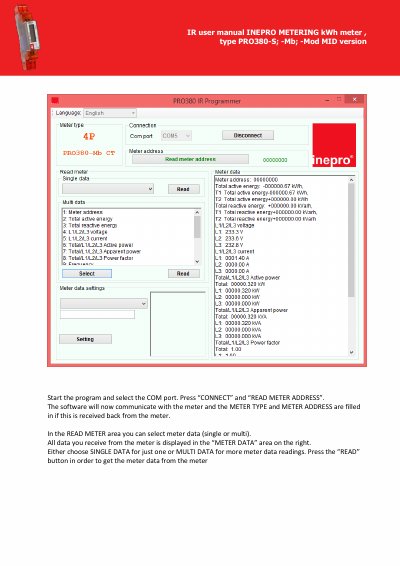
IR user manual for the Inepro Metering PRO 380-S -Mb -Mod MID kWh meter. It describes starting the program, selecting the COM port, pressing CONNECT and READ METER ADDRESS, and reading meter type and address when data is returned. The READ METER area offers SINGLE DATA or MULTI DATA readings, and received values appear in METER DATA.
The METER DATA SETTINGS area has nine selections depending on the meter version. These cover meter address, combination code, S0 output, LCD scrolling time, LCD scrolling pages, M-Bus/Modbus baud rate and ID, backlight settings, and resetting the day counter. The document also lists the available option values and defaults.
Covers: Connecting and reading the meter address · Reading single or multi meter data · Meter address setting · Combination code · S0 output · LCD scrolling time and pages
Latest Inepro Metering manuals
Inepro Metering PRO 380-S -Mb -Mod MID kWh Meter IR User Manual
User Manual 3 pages · 463 KB · ENIR user manual for the Inepro Metering PRO 380-S -Mb -Mod MID kWh meter, covering meter connection, address reading, data reading and parameter settings.
Which document do I need?
User Manual
Day-to-day operation, settings and troubleshooting. Start here if the product is already set up.
Questions answered in Inepro Metering manuals
How do I read meter data?
Start the program, select the COM port, press CONNECT and READ METER ADDRESS, then choose SINGLE DATA or MULTI DATA and press READ.
From: Inepro Metering PRO 380-S -Mb -Mod MID kWh Meter IR User Manual
What is the default M-Bus/Modbus baud rate?
The default baud rate is 9,600. Other options listed are 9,600, 4,800, 2,400, 1,200, 600 and 300.
From: Inepro Metering PRO 380-S -Mb -Mod MID kWh Meter IR User Manual