
Key facts
- Manuals
- 1
- Languages
- EN
- Last added
- 2023-10-30
Featured PiBot manuals
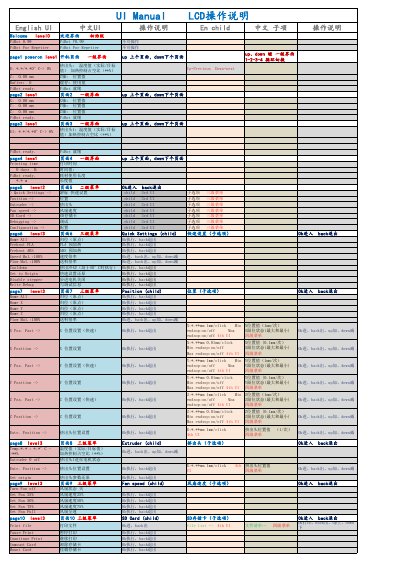
PiBot 3D Printer LCD User Interface Operation Manual
This PiBot document explains the LCD user interface of the PiBot 3D printer, presented in English and Chinese side by side. It walks through each menu level, starting with the welcome screen that shows PiBot V0.99, then the level 1 status pages that display extruder temperature, axis positions, buffer usage, printing time and filament length.
The manual then covers the level 2 menu and its sub-menus: Quick Settings, Position, Extruder, Fan speed, SD Card, Debugging and Configuration. It lists the key actions for each entry (Ok to enter, back to exit, up/down to change values) and describes the level 3 and level 4 setting screens, including acceleration, feedrate and extruder parameters such as steps per mm, PID values and EEPROM storage.
Covers: Welcome screen (level 0) · Main pages 1-5 (level 1) · Quick Settings · Position · Extruder · Fan speed
Latest PiBot manuals
PiBot 3D Printer LCD User Interface Operation Manual
User Manual 2 pages · 174 KB · ENBilingual guide to the PiBot 3D printer LCD menus, from the welcome screen and main pages to quick settings, position, extruder, fan, SD card and configuration.
Which document do I need?
User Manual
Day-to-day operation, settings and troubleshooting. Start here if the product is already set up.
Questions answered in PiBot manuals
How do I change the fan speed on the PiBot LCD?
Open the Fan speed sub-menu and choose Turn Fan off, Set Fan 25%, 50%, 75% or Set Fan Full; press Ok to execute and back to exit.
How do I pause a print from the SD card menu?
In the SD Card sub-menu select Pause Print and press Ok to execute; Continue Print resumes the job.