
Key facts
- Manuals
- 1
- Languages
- JA
- Last added
- 2026-11-06
Featured Daiwa Industrial manuals
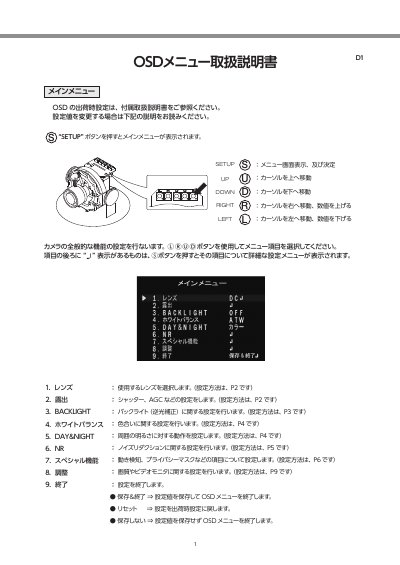
Daiwa Industrial Camera OSD Menu Setting Manual
This Daiwa Industrial document explains the camera OSD (on-screen display) setup menu and how to operate it. Pressing the SETUP button shows the main menu, which includes lens, exposure, backlight, white balance, DAY&NIGHT, noise reduction, special functions, adjustment and exit items.
Use the cursor buttons to select menu items and the SET button to open detailed settings. Settings can be saved and exited, reset to factory defaults, or exited without saving. This manual is written in Japanese.
Covers: レンズ · 露出 · BACKLIGHT · ホワイトバランス · DAY&NIGHT · NR
Latest Daiwa Industrial manuals
Daiwa Industrial Camera OSD Menu Setting Manual
User Manual 9 pages · 1.4 MB · JADaiwa Industrial camera OSD menu setting manual covering lens, exposure, backlight, white balance, day/night and noise reduction settings.
Which document do I need?
User Manual
Day-to-day operation, settings and troubleshooting. Start here if the product is already set up.
Questions answered in Daiwa Industrial manuals
How is the main menu displayed?
Pressing the SETUP button displays the main menu.
What does “保存しない” do?
It exits the OSD menu without saving the setting values.