
Key facts
- Manuals
- 1
- Languages
- EN
- Last added
- 2026-11-06
Featured CHUBUTSU PRECHISE manuals
CHUBUTSU PRECHISE LCD Button User Manual
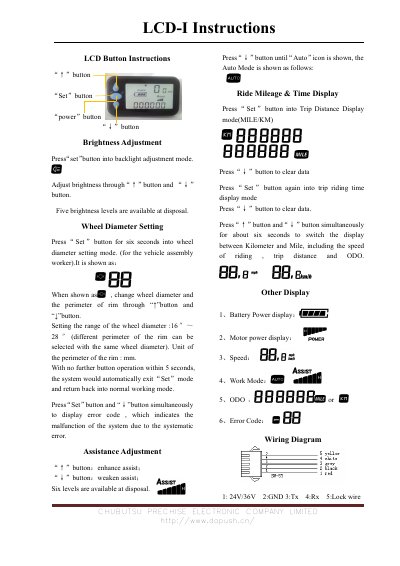
This document provides instructions for operating a CHUBUTSU PRECHISE LCD Button device. It details functions such as brightness adjustment, wheel diameter setting, assistance adjustment, and ride mileage and time display. The manual explains how to use the 'Set', 'Power', 'Up', and 'Down' buttons to configure various system parameters.
Covers: Brightness Adjustment · Wheel Diameter Setting · Assistance Adjustment · Ride Mileage & Time Display · Other Display · Wiring Diagram
Latest CHUBUTSU PRECHISE manuals
CHUBUTSU PRECHISE LCD Button User Manual
User Manual 1 pages · 132 KB · ENOperating instructions for the CHUBUTSU PRECHISE LCD Button, covering brightness, wheel diameter, assistance, mileage, time, and wiring diagrams.
Which document do I need?
User Manual
Day-to-day operation, settings and troubleshooting. Start here if the product is already set up.
Questions answered in CHUBUTSU PRECHISE manuals
What buttons are used to adjust brightness on the LCD button?
Press the 'Set' button to enter backlight adjustment mode, then use the '↑' and '↓' buttons to adjust brightness.
What is the range of wheel diameter settings available?
The wheel diameter can be set between 16 inches and 28 inches.