
Key facts
- Manuals
- 1
- Languages
- EN
- Last added
- 2023-10-21
Featured Texas Children’s Hospital manuals
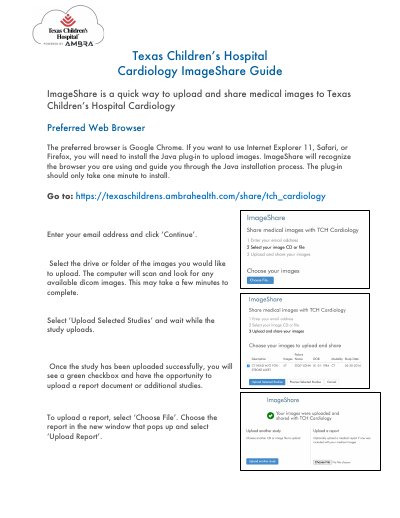
Texas Children’s Hospital ImageShare User Guide
This guide explains how to use ImageShare to upload medical images. Users must use a compatible browser, such as Google Chrome, or install Java for Internet Explorer, Safari, or Firefox. After entering credentials, users select DICOM images from a drive or folder and upload them. Reports can also be uploaded after successful image upload.
Covers: Browser Requirements · Java Installation · Uploading Images · Uploading Reports
Latest Texas Children’s Hospital manuals
Texas Children’s Hospital ImageShare User Guide
User Manual 1 pages · 241 KB · ENUser guide for uploading and sharing medical DICOM images via Texas Children’s Hospital Cardiology ImageShare.
Which document do I need?
User Manual
Day-to-day operation, settings and troubleshooting. Start here if the product is already set up.
Questions answered in Texas Children’s Hospital manuals
What browser is preferred for using ImageShare?
The preferred browser is Google Chrome. If using Internet Explorer 11, Safari, or Firefox, you will need to install the Java plug-in.
How do I upload medical images?
Enter your email address, select the drive or folder with DICOM images, and click ‘Upload Selected Studies’.